
Citation Generator
Enter the details of your source and get a correctly formatted reference in APA 7th edition, MLA 9th edition or Chicago style — with the authors in the right order, italics in the right places and a matching in-text citation. Works for websites, books and journal articles, and nothing you type is uploaded.
- Free to use
- No sign-up
- Runs in your browser
Citation generator
Reference
In-text:
Citation Style Quick Guides
Printable APA 7, MLA 9 and Chicago quick-reference guides, an Excel research source tracker and an annotated bibliography template.
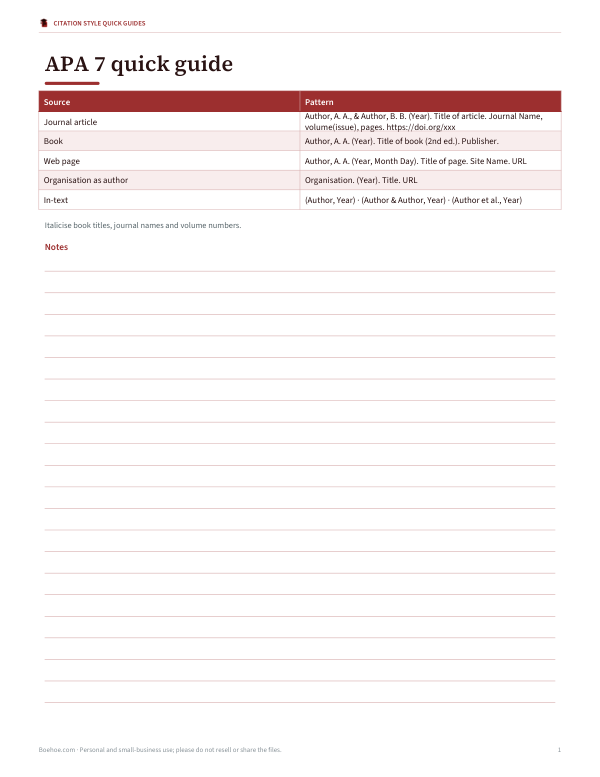
- APA 7 quick guide (PDF)
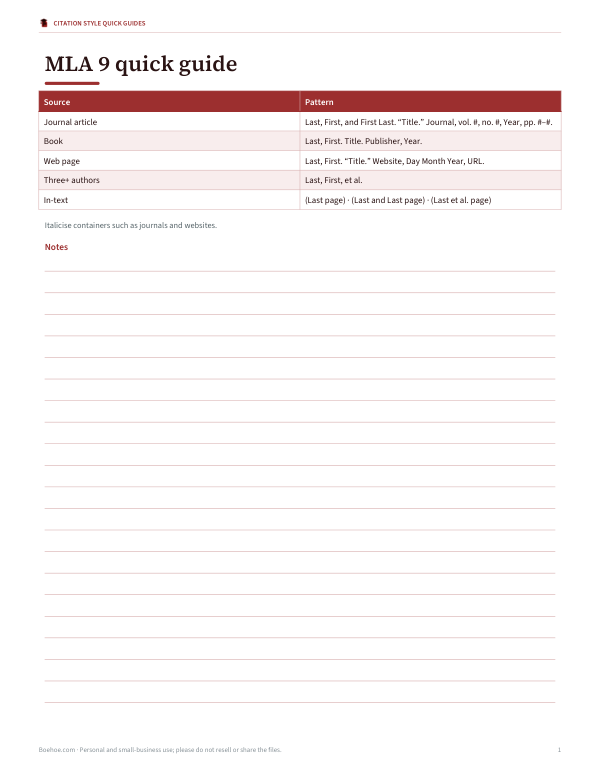
- MLA 9 quick guide (PDF)
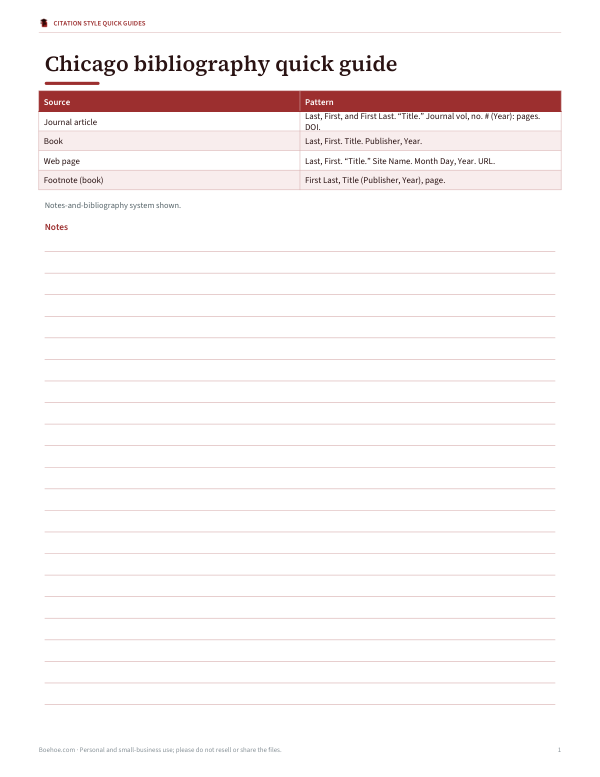
- Chicago quick guide (PDF)
- Source tracker (XLSX)
- Annotated bibliography (DOCX)
Formats: PDF, XLSX, DOCX. Instant download after payment (link valid 72 hours, up to 5 downloads). AI-assisted: the templates were drafted with AI help and reviewed and laid out before publishing.
$4.00 USD, one-time 5 files · about $0.80 each
- Instant download
- 7-day refund
- Secure checkout by Stripe
✓ Classroom use included
7-day money-back guarantee. Full refund within 7 days of purchase, even after you download.
Free sample: APA 7 Quick Guide (PDF, 57 KB)
Full refund within 7 days — see the refund policy and license.
License: personal and classroom use. Teachers may print and photocopy these files for the students in their own classes, and share them in a password-protected class space (e.g. Google Classroom). Please do not resell, redistribute, or post the files on public websites. One purchase covers one teacher.
Free printables
Single sheets you can print right now, no sign-up. The full pack adds every sheet in one download plus the editable files.
 Printable Research Source Tracker
 Printable Annotated Bibliography Template
How to use the citation generator
- Choose the citation style your teacher, journal or publisher requires.
- Choose the source type: web page, book or journal article.
- Enter the authors one per line, as “First Last” or “Last, First”. Leave blank if there is no author.
- Fill in the title, the website, journal or publisher, and the year, plus volume, issue and pages for articles.
- Add the DOI (preferred) or URL.
- Copy the reference with formatting so italics are kept, and paste it into your reference list.
Always check the result against the source and your style guide — a generator can only format the information you give it.
APA, MLA and Chicago at a glance
| Style | Used in | Reference list name | In-text format |
|---|---|---|---|
| APA 7 | Psychology, education, social sciences, nursing | References | (Author, year) |
| MLA 9 | English, literature, languages, humanities | Works Cited | (Author page) |
| Chicago | History, arts, some sciences and publishing | Bibliography | Footnotes or (Author year page) |
Examples: journal article
| Style | Reference |
|---|---|
| APA 7 | Gonzalez, M. L., & Okafor, J. (2024). Urban trees and summer heat: A city-wide study. Journal of Urban Ecology, 10(1), 45–58. https://doi.org/10.1234/jue.2024.0105 |
| MLA 9 | Gonzalez, Maria L., and James Okafor. “Urban Trees and Summer Heat: A City-Wide Study.” Journal of Urban Ecology, vol. 10, no. 1, 2024, pp. 45–58, doi.org/10.1234/jue.2024.0105. |
| Chicago | Gonzalez, Maria L., and James Okafor. “Urban Trees and Summer Heat: A City-Wide Study.” Journal of Urban Ecology 10, no. 1 (2024): 45–58. https://doi.org/10.1234/jue.2024.0105. |
These examples use a fictitious article to show the pattern. Note how APA uses initials and an ampersand, MLA reverses only the first author’s name, and Chicago puts the year in parentheses after the issue.
Where to find citation details
- Journal articles — the first page of the PDF or the article web page lists authors, journal, volume, issue, pages and DOI.
- Books — the title page and copyright page (the reverse of the title page) give the publisher, year and edition.
- Web pages — look for an author byline, a published or updated date near the top or bottom, and the organisation name.
- No author? Use the organisation as author if it wrote the page; otherwise start with the title.
- No date? Use “n.d.” in APA; omit it in MLA and add an access date instead.
DOIs and URLs
A DOI (Digital Object Identifier) is a permanent link for a journal article or book chapter, written as https://doi.org/10.xxxx/xxxxx. APA and Chicago include the full DOI link; MLA also recommends DOIs and drops the “https://” prefix. Use a URL only when there is no DOI. Avoid URLs from library databases or search results, which often expire.
Common citation mistakes
- Using the website’s home page URL instead of the specific page.
- Forgetting italics on book, journal or website titles.
- Mixing styles, such as APA initials with MLA punctuation.
- Writing “Retrieved from” before URLs in APA 7 (no longer needed).
- Citing a secondary source as if you read the original.
- Missing page numbers for direct quotations.
Formatting the reference list
Reference lists are alphabetical by first author’s surname, double-spaced for most student papers, with a hanging indent — the first line flush left and following lines indented half an inch. The preview above uses a hanging indent so you can see the shape. In Word or Google Docs, set it under paragraph indentation options.
Citing sources with no date, pages or author
| Missing | APA 7 | MLA 9 | Chicago |
|---|---|---|---|
| Author | Start with the title | Start with the title | Start with the title or organisation |
| Date | (n.d.) | Omit; add an access date for web pages | Use “n.d.” or an access date |
| Page numbers | Use paragraph numbers (para. 4) for quotes | Omit in the in-text citation | Omit or use section headings |
When a source is missing basic details, consider whether it is reliable enough to cite. Official organisations, peer-reviewed journals and established publishers usually make their authorship and dates clear.
Citing sources inside your text
Every entry in the reference list should match at least one in-text citation, and every in-text citation should point to a reference-list entry. In APA, use the author and year, adding a page number for direct quotes: (Gonzalez & Okafor, 2024, p. 47). In MLA, use the author and page: (Gonzalez and Okafor 47). In Chicago notes-and-bibliography style, a superscript number in the text points to a footnote with the full or short citation. Keep the style consistent throughout a paper.
Academic integrity
Citing sources credits other people’s ideas and lets readers find them. Cite whenever you quote, paraphrase or use specific facts, data or ideas from a source. A citation generator saves formatting time, but understanding why and when to cite is part of good academic practice; ask your instructor or library if you are unsure.
Privacy
Citations are generated in your browser. What you type is not uploaded or stored.
Frequently asked questions
Is this citation generator accurate?
It follows the published patterns for APA 7, MLA 9 and Chicago, but always check the result against your source and style guide.
How do I cite a website with no author?
In APA, start with the title; in MLA, start with the title in quotation marks; or use the organisation as author if it wrote the page.
Should I use a DOI or URL?
Use the DOI whenever the source has one.
Does APA use title case?
APA uses sentence case for article, book and web page titles, and title case for journal names.
How many authors does APA list?
Up to 20; for 21 or more, list the first 19, an ellipsis, then the last author.
Is my information saved?
No, nothing is uploaded or stored.
May I print and share these worksheets with my class?
License: personal and classroom use. Teachers may print and photocopy these files for the students in their own classes, and share them in a password-protected class space (e.g. Google Classroom). Please do not resell, redistribute, or post the files on public websites. One purchase covers one teacher.